Desktop Pension Squad DLC: All 4 Packs and Which to Buy
Short answer: DPS: Desktop Pension Squad is free to play, and four optional DLC packs went on sale with it on November 11, 2026: Character Pack: Chopper ($4.99), Storage Pack ($4.99), Supporter Pack ($3.99) and Convenience Pack ($4.99). All four together cost $18.96 in the US. None of them is required to play, and none sells gear. Chopper is the only pack that adds a hero. The other three add storage space, pets with small bonuses and quality-of-life features. On November 18, 2026, the Convenience Pack was the only pack with a review score on Steam, and that score was Negative.
All four DLC packs at a glance
| Pack | US price | What you get |
|---|---|---|
| Character Pack: Chopper | $4.99 | Chopper, a fourth playable hero |
| Storage Pack | $4.99 | 3 more storage tabs, tab renaming, filters by rarity and slot |
| Supporter Pack | $3.99 | Patron's Lantern pet (EXP gain +5%), a pet halo skin, a choice of Icon Mode icon |
| Convenience Pack | $4.99 | Hardworking Broomie pet (offline rewards +10%), continuous fuse and salvage, auto-equip, 1 more gear and skill preset slot |
Source: each pack's Steam store page, November 18, 2026. None of the packs was discounted that day. The game's store page has an "Add all DLC to Cart" button, but there is no discounted bundle.
Character Pack: Chopper ($4.99)
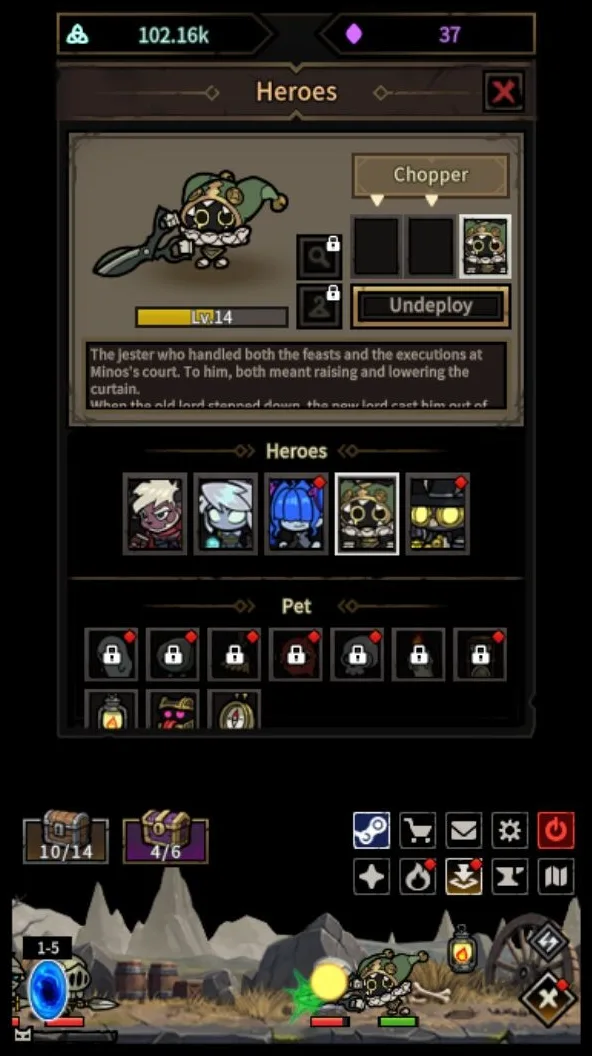
Chopper is a jester executioner with a pair of giant shears. The store page calls him a melee damage dealer who switches between combat stances. To use him, open Menu > Formation and add him to your squad. Once he is deployed, he fights on his own like the other heroes.
The developers explained his kit in their Dev Log #4 on Steam:
- Two forms. Joined, the shears make one big cut. Split, they become two blades for fast slashes. Every active skill switches his form.
- Two elements. The joined shears use fire, and the split blades use lightning.
- His role. Chopper avoids hits, attacks fast and finishes enemies with low health. His skill names are theater terms: Applause, Encore, Curtain Call and Intermission.
Patch v1.0.3 on November 13 fixed status effect visuals that did not appear on Chopper. Every change since launch is listed in the Desktop Pension Squad patch notes.
Do you need him? No. On November 12, a player posted a guide on the Steam discussion board for the Normal 2-10 boss that puts Chopper in the middle of a Minos, Chopper and Diana formation. A reply in the same thread gives a version without the DLC, using Minos, Diana and Mori & Gula. Chopper gives you more team options. He is not the only way through. The free heroes are described in the heroes section of the guide.
Storage Pack ($4.99)
The Storage Pack gives you:
- 3 additional storage tabs
- Renamable tabs
- Item filters by rarity and equipment slot
Open storage under Menu > Heroes > Storage. Tab names and filters are under Storage > Settings.
This pack is for players who keep a lot of gear, for example to sell later. Only Legendary items or better can go on the Steam Community Market, and most Legendary pieces sell for a few cents, so most gear is not worth storing for sale. See the Desktop Pension Squad Steam Market guide for prices. One player on the discussion board complained on November 12 that storage overflows in the mid-20s levels, with gear piling up before heroes can wear it. Before you buy this pack, try salvaging gear you will not use.
Supporter Pack ($3.99)
The store page says this pack is for players who want to support the development team. It includes:
- Patron's Lantern, a pet with EXP gain +5%. Equip it under Menu > Formation.
- A pet halo skin, which you can turn on or off in Options.
- A choice of icon for Icon Mode, under Menu > Settings > General.
The bonus is small, so think of this pack as a tip to the developers. The developers have adjusted pets in two patches since launch. v1.0.3 improved this pack's pet aura. v1.0.4 on November 17 stopped pet auras from rotating and fixed auras that looped too fast after more than 10 hours of play. It also fixed pets falling behind when Movement Speed is above 250%.
Convenience Pack ($4.99)
The Convenience Pack gives you:
- Hardworking Broomie, a pet with offline rewards +10%
- Continuous Fuse
- Continuous Salvage
- Auto-Equip Gear
- 1 additional gear and skill preset slot. Switch presets with the button below the hero's portrait under Menu > Heroes.
Its reviews are the worst of the four. On November 18, 2026, its Steam page showed 22 user reviews and none of them positive, a "Negative" rating. The game itself was rated Mostly Positive, with 78% of 1,703 reviews positive.
The game's Steam discussion board shows what some buyers complained about:
- Fusing and salvaging still need a click. On launch day, two buyers wrote that they had to start fusing and salvaging by hand. They had expected the pack to do it on its own while the game idles. One said they refunded the pack.
- "Doesn't work." A post on November 12 said the paid auto fusion was broken.
- Equipped gear salvaged. A player reported on November 16 that auto-salvage broke down a weapon their hero was still wearing.
These are player reports. As of November 18, no patch note said that fusing and salvaging now run without a click. v1.0.4 changed how Auto-Equip picks gear: defensive stats such as HP Recovery and Life Steal now count for more, and higher-tier equipment is rated higher. The same patch fixed problems with equipping gear and skill presets.
Whichever fuse and salvage tools you use, lock every item you want to keep first. The developers' v1.0.3 notes confirm that locked items are excluded from Auto-Fuse and Auto-Salvage.
Which pack is worth buying?
- Want another hero? Chopper is the only pack that adds one.
- Always running out of space? The Storage Pack helps, but try salvaging gear you will not use first.
- Want to support the developers? Get the Supporter Pack. Do not buy it for the +5% EXP alone.
- Want hands-off fusing and salvaging? Read the Convenience Pack section above first. Buyers say it is not fully automatic. If it disappoints you, Steam's refund window is short (see below).
You can skip all four. None of them sells gear. Gear comes from battles, or from other players on the Steam Community Market.
DLC prices in other regions
Packs that cost the same in the US can cost different amounts elsewhere: Chopper and Storage are both $4.99 in the US, but £4.59 and £4.19 in the UK. These are the prices on November 18, 2026, in the order Chopper, Storage, Supporter, Convenience:
- United States: $4.99, $4.99, $3.99, $4.99 (all four $18.96)
- United Kingdom: £4.59, £4.19, £3.59, £4.59 (all four £16.96)
- Germany (euro): €5.19, €4.89, €4.15, €5.19 (all four €19.42)
- Canada: CDN$ 5.99, 6.29, 4.59, 5.99 (all four CDN$ 22.86)
- Australia: A$ 6.95, 7.05, 5.75, 6.95 (all four A$ 26.70)
- Brazil: R$ 19.49, 17.99, 15.75, 19.49 (all four R$ 72.72)
- Japan: ¥655, ¥705, ¥530, ¥655 (all four ¥2,545)
- South Korea: ₩5,450, ₩5,600, ₩4,400, ₩5,450 (all four ₩20,900)
Your store page may show a different price if you are in another country or a sale starts.
Can you refund a DLC pack?
Usually, yes, if you are quick. Under Steam's refund policy, you can get a refund for DLC within 14 days of buying it, if you have played the game for less than two hours since the purchase. Steam marks DLC that cannot be refunded on its store page, and none of the four packs carries that mark. Request a refund through Steam Support at help.steampowered.com.
Free DLC from the launch event
The developers are running a launch giveaway from November 12 to November 25, 2026. They say the prizes include Steam Gift Cards and game DLC. How to enter is posted on their official Discord server, discord.gg/BjatjrwwnX, which their Steam announcement links to.
Bought a pack but don't see it in the game?
- In your Steam Library, open Desktop Pension Squad and check the DLC section of its page. The pack should be listed there.
- Close the game completely and start it again. If that does not help, quit Steam with Steam > Exit and reopen it.
- Look in the right menu: Chopper and the pets are added under Menu > Formation, and the extra storage tabs are under Menu > Heroes > Storage.
- If it is still missing, contact the publisher's support at cs@storytaco.com. Include your Steam ID and the date of purchase.
If the game itself will not start, see Desktop Pension Squad not launching or connecting.
Related questions
- Is Desktop Pension Squad pay to win? The developers do not sell gear. The paid bonuses are small (+5% EXP and +10% offline rewards), and Chopper is one extra hero choice. Other players' Legendary-or-higher gear can be bought on the Market, explained in the Steam Market guide. More answers are in the Desktop Pension Squad FAQ.
- Where do I find and install the DLC? All four packs are listed under Content For This Game on the game's Steam store page, which also has an Add all DLC to Cart button. After you buy a pack, restart the game. The pack then shows in the DLC section of the game's page in your Steam Library. Chopper and the pets appear under Menu > Formation, and the extra storage tabs under Menu > Heroes > Storage. If a pack is missing, follow these steps.
- Can my Steam Family use my DLC packs? Probably not. Steam's Steam Families FAQ lists "free to play games and any purchased DLC for those games" as content that cannot be shared between accounts, and Desktop Pension Squad is free to play. The four DLC store pages do show a Family Sharing label, so this is unclear. To be safe, each person should buy the packs they want on their own account. The base game costs nothing, so everyone in the family can install it.
- Will there be more DLC? On November 18, 2026, Steam listed only these four packs, and the developers had not announced any others.
- Is the base game going to stay free? Yes. The developers say it will stay free after Early Access. See the Desktop Pension Squad guide.
- Can I play the game or its DLC on a phone or Mac? No, it runs only on Windows. See Can you play Desktop Pension Squad on Android, iPhone or Mac?
Last checked: November 18, 2026, against the four DLC store pages, the game's Steam store page, the developers' patch notes and dev logs on Steam, Steam's refund policy and the game's Steam discussion board. Player reports are labeled as reports, not confirmed facts. Family Sharing rules checked against Steam's Steam Families FAQ on November 19, 2026.